
When your HP laptop battery replacement required due to clearly fails and the device starts showing various signs, battery replacement becomes necessary. Such issues as the battery running out too fast, your HP laptop shutting down without a warning, problems with recharging, overheating, and system warning alerts all demonstrate a decrease in the efficiency of your laptop battery.
If you disregard these five powerful signals of battery failure, you will certainly experience a decrease in your productivity, loss of data, and, most probably, damage to other components of your laptop. A timely decision on battery replacement, resulting from an early and correct recognition of these five vital signs, will guarantee better HP laptop performance, enhanced safety, and extended battery life.
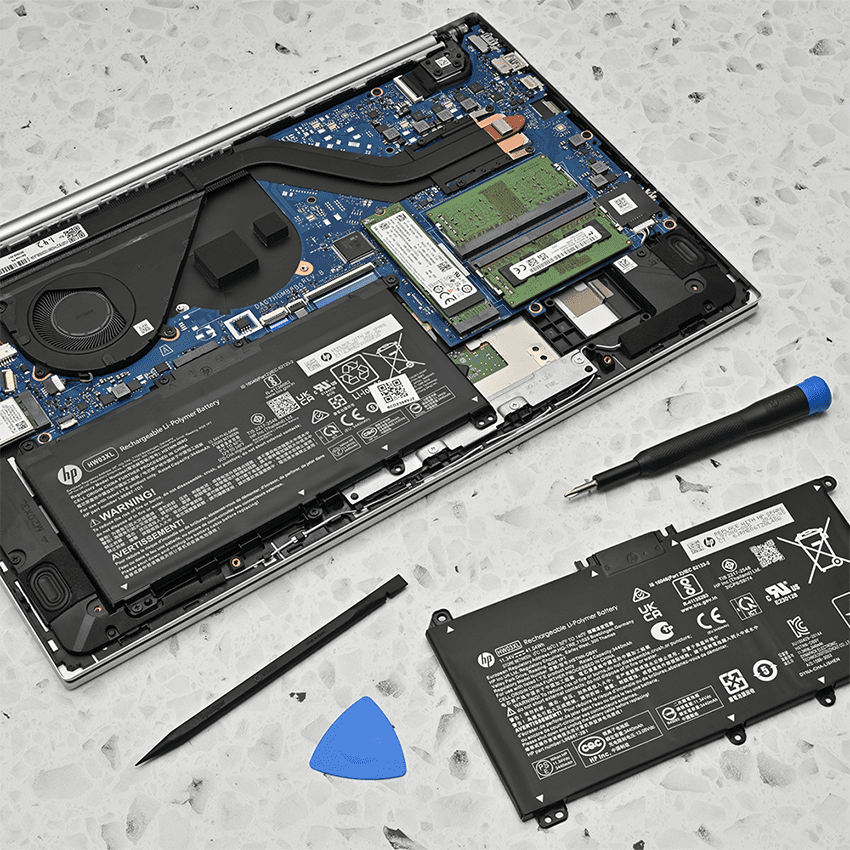
1. Rapid Battery Drain
If you notice that your battery drains suddenly or very quickly after charging, this is probably the first and most obvious symptom of what is wrong with your HP laptop battery. If in the past your laptop could last hours on just one charge, and now it barely passes an hour, the battery cells are most likely deteriorating. Lithium-ion batteries eventually lose their charge-holding ability due to regular use, exposure to heat, and aging.
Usually, this problem gets worse gradually, so users almost unconsciously keep adjusting their habits until the battery becomes unreliable. Continual neglect of this symptom may result in frequent charging cycles, loss of productivity, and unexpected shutdowns of the device. The performance can be restored after a new battery has been installed thus preventing damage from further internal stress.
Laptop Loses Power Faster Than Normal
If your HP notebook becomes out-of-power quicker than usual, it means your battery is growing old and not giving full capacity anymore. It can happen to you that the battery gets depleted very fast even if you are using your computer for very simple tasks like checking the internet or writing text, and only if the machine is continuously plugged into the power outlet can you avoid this. The cause of this dilemma may be exhausted battery cells that are incapable of holding the charge for long.
Therefore, a new battery in your HP laptop will make it as good as new or at least very close to it. Besides, deterioration of the battery might reduce system efficiency and result in the most delicate parts of the PC being injured. Users mostly postpone a replacement solution hoping that a software update will bring back the system’s previous health but the truth is that it’s hardware which gets worn out and cannot be restored digitally. An on-time replacement of an HP laptop battery would be of great help not only for the uninterrupted power supply and extended battery life but also for the overall reliability of the device without those annoying unexpected shutdowns or whatever.
Battery Percentage Drops Suddenly
A sudden drop of the battery percentage let’s say from 40% down to 10% in such a short time that you cannot even react fast enough indicates a problem with battery calibration or the presence of defective cells. The reason why the battery cannot communicate the operating system its current levels of the charge is the damage to the cells which eventually stopped functioning.
As a consequence of the fault here described, the PC may turn itself off without any warning, thus getting the user at risk of data loss without any possibility to prevent it. What causes these grave mistakes in reading is replaced by a new HP laptop battery which, apart from the capacity, also has the right calibration. Being dependent on a malfunctioning power source carries a great risk of your schedule being disrupted.
Technicians say that this is a problem that can easily be mistaken for a bug in the software, but it becomes unambiguous after it happens repeatedly that it is really a matter of a hardware fault calling for a laptop battery replacement. With a new battery, your laptop will regain the ability of accurate display of the percentage of charge remaining in the unit and thus your comfortable use as well as the trust in the battery will be restored. The bet on a professional battery replacement by an authorized service center is a safe investment in the long run.
2. Laptop Shuts Down Without Warning
Unexpected shutdowns in the middle of work are very annoying and sometimes they pose a real danger to your data. If the battery indicator in your HP laptop shows some left-over charge but the computer still switches itself off, then battery failure is a very definite diagnosis. It refers to the state of the battery when it is no longer able to provide a stable voltage output to the system. Data loss, disruption of the installation process, and deterioration in hardware parts may be some of the consequences of an abrupt shutdown.
Many users are puzzled by such a symptom and assume that it is a result of overheating or a bug in the system but they are actually battery deterioration signs most times. Battery failure can be prevented if one doesn’t ignore this symptom for a long time. With a new battery in place, your laptop will work fine and you will be assured of system stability again.
Unexpected Power Off Even with Charge Left
In case your computer powers off while it still displays 20% or 30% battery, the internal cells of the battery are most probably broken. The computer still thinks that the battery is full of power but in fact, the battery is the one that does not supply the power. At this point, the only solution is to go for an HP Laptop Battery Replacement. If you keep on using the laptop under these circumstances, you risk losing unsaved work and corrupting system files by the accident of power loss.
Most of us in the professional world hit the power-off problem right in the middle of the presentation or a crucial job. By taking the HP Laptop Battery Replacement path, you will be back to having a steady voltage supply and you won’t worry about whether your computer shuts down by itself ever again. Users who put off HP Laptop Battery Replacement usually find that the random shutdowns keep happening more frequently. Getting a genuine HP Laptop Battery Replacement is the best measure to take if you want your laptop to run continuously and trust ably in any condition.
System Turns Off During Normal Use
A situation where your system just powers down automatically for no good reason while you are doing some browsing or watching videos may be a sign that the battery is simply not holding up the laptop anymore and it can no longer supply the power needed in even low situations. It is a telltale sign of a very degraded battery. One should not expect that such an issue can be fixed by software means ones usually employed to do so, hence HP Laptop Battery Replacement tends to be the real remedy.
Carrying on with the shutdowns is a sure signal that even after a very light usage, the battery can no longer hold power. The good news is, you can change all that by taking the step of HP Laptop Battery Replacement and thus restore your trust in your gadget’s performance again. Not dealing with the problem may result in the power irregularities hurting the motherboard parts as well. Proper and high-quality HP Laptop Battery Replacement will help to not only bring back the regular power supply but also save your internal hardware. A timely HP Laptop Battery Replacement really is a must if you want to be able to work without interruptions daily.
3. Battery Not Charging Properly
Besides power-off problems, charging issues are yet another significant indicator that your HP laptop battery is in dire need of replacement. When you notice that the battery charges in a very sporadic manner or that it just stops charging at some percentage point, it is a sign that the battery itself may be totally denied or at least heavily discouraged from accepting any more power by the charging. It is almost like it has become a closed circuit.
The users may even get system messages warning them of charging problems or similar stuff. These kinds of signs overwhelmingly point to battery failure and not to the charger being faulty. If you do not take charging problems seriously, you will be a person with less and less freedom of movement and efficiency of work. A skilled professional HP Laptop Battery Replacement will get your device back to a state in which it keeps its charge normally again and actually uses the battery properly.
Laptop Stuck at a Certain Percentage
Most likely, your laptop’s battery is at the end of its life when the device shows you that the battery is full at 60%, 80%, or 90% even though you have it connected to the power supply. This is very much like the battery saying its capacity is full or its total capacity is seriously limited. Essentially, this is the same as the battery cells being dead inside. By going for an HP Laptop Battery Replacement, the machine will be able to load itself to 100% again.
One could very often witness people who would keep on unplugging and plugging in the power adapter not knowing that at some point the battery would inevitably fail. Waiting too long for a HP Laptop Battery Replacement is equivalent to getting less time out of your battery and experiencing charging being unstable more and more.
The battery taken out of a device that had been in use for a while still affords good charging performance and has its capacity restored to the fullest when it is newly acquired. HP Laptop Battery Replacement guarantees you steady charging behavior at all times. Expert HP Laptop Battery Replacement is what you turn to when you want to forget about your charging stage and when you look for maximum usage duration from your laptop.
“Plugged In, Not Charging” Message
It is pretty obvious from the message “Plugged in, not charging” that the battery is basically a dead one. Simply, the charger is putting out electricity but the battery has decided to not take it in. More often than not, the battery is just one that has gotten completely used up. There really is no other way around except going with the HP Laptop Battery Replacement if it looks like this is going to be a permanent condition. The lack of solutions that software can bring to the table is the most common thing when this problem is going on.
Women and men who choose to put off HP Laptop Battery Replacement more often than not end up with a laptop that has to be physically connected to a power source all the time before it does any work. An investment in HP Laptop Battery Replacement means that the behaviour of your battery reverting to a normal charging type has been successfully achieved. Top-notch HP Laptop Battery Replacement helps regain the functional condition of your laptop once was without putting limitations on the power side.
4. Overheating and Swollen Battery
One of the very risky signs of a failing battery is the excessive heating and, possibly, the swollen of the battery. In this regard, a user should never ignore a battery that is getting extremely hot. Besides, since swollen batteries come with safety hazards including fire hazards, the heat can also spread from the battery to other components that might be near it thus leading to further damages if the device is not shut down.
In fact, besides the physical changes in the laptop casing resulting from a swollen battery, the internal explosion of the battery can be possible. When such happens to an HP laptop, it is recommended that one should immediately do the HP Laptop Battery Replacement to maintain the user’s safety and device integrity.
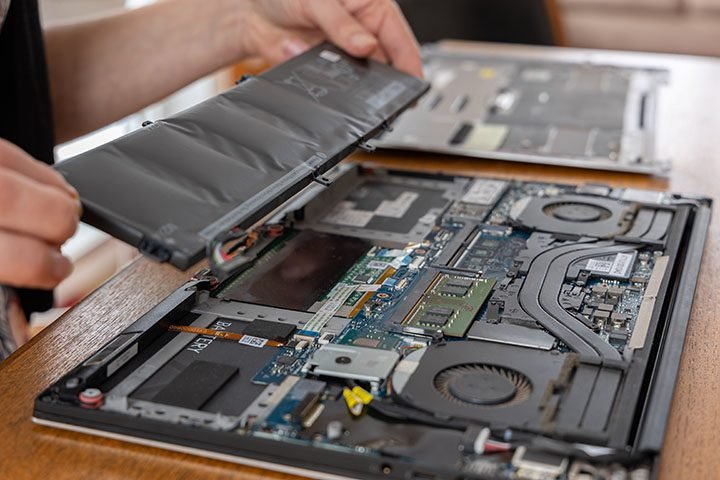
Laptop Feels Hot Around Battery Area
If you notice that your HP laptop gets unusually hot at the bottom, with the heating being most intense near the battery compartment, it is likely that the battery is under stress inside. Damaged cells that are not properly regulating the energy flow cause battery overheating. With a quick decision for HP Laptop Battery Replacement, the problem of extreme heat due to the battery can be eliminated. A leak from inside overheating the battery can destroy internal circuits.
At the time when performance goes down, a lot of users don’t bother about the heat they are feeling. By changing the battery, the HP Laptop Battery Replacement can be easily done and your device will go back to a comfortable temperature. Not getting rid of this problem can pose serious threats to your safety. After a professional HP Laptop Battery Replacement, your device will be able to work at a safe temperature
Trackpad or Keyboard Appears Raised
One of the sure signs that a swollen battery is the root cause is when the battery swelling can be seen in the raised trackpad or keyboard area. This is a pretty serious physical indicator that you should not rely on and instead, go for a quick solution. Taking prompt action by doing HP Laptop Battery Replacement will save you from further consequences that result from internal structural damage. If you choose not to do anything about such an issue the internal parts may eventually even crack and the repair work will thereby become very expensive.
The reason for the swelling is that there is a gas that is building up inside the battery cells. The safest thing to do when you notice the swelling is a quick reaction of having the HP Laptop Battery Replacement done. Users must refrain from using the laptop until HP Laptop Battery Replacement are done. Proper HP Laptop Battery Replacement that is done safely protects both the user and the device.
5. Battery Health Warning Messages
HP laptops come with a handy feature of sending out a warning to the users to notify them when the battery health reaches a low level. These warning signs are displayed either in the BIOS or in the system notifications. In fact, the messages are not errors but rather the ones that are mounted to prevent the users from inconveniences. If a person ignores these signs, it is possible that the battery will suddenly fail. Early recognition of these signals by the users will allow them to make timely arrangements and prevent the situation from worsening. Under most conditions, it is the best thing to do to get HP Laptop Battery Replacement.
HP Battery Alert or BIOS Warning
When you receive a battery warning from your HP system after a reboot, it basically means that the battery has just failed the health diagnostics. No doubt the alerts are trustworthy and they must not be disregarded. Carrying out HP Laptop Battery Replacement will sort out the problem once and for all. If you ignore the warnings and keep using the laptop, it will be unstable.
These kinds of alerts have been built-in by HP for the purpose of preventing users from being caught off-guard by sudden failures. Not paying attention to them will only mean that you are putting off your next HP Laptop Battery Replacement which you definitely will need. You are making sure that your system is very dependable when you act right away. A professional HP Laptop Battery Replacement is what it takes to get rid of warning messages and have full functionality.
Operating System Battery Health Notifications
The operating systems are very clever; they also monitor battery health and they display messages to users if capacity goes down. The appearance of the battery warning in the OS is a sign of the shortened battery lifespan. To have better performance and correct battery capacity reporting doing HP Laptop Battery Replacement is a good idea. People who do not heed the warnings from the operating system usually experience sudden shutdowns.
As soon as HP Laptop Battery Replacement is done, the user will be able to rely on the device again for normal everyday use. The system notifications have been created with the intention to keep the users from being inconvenienced. By reacting to them through HP Laptop Battery Replacement your work will be more efficient. The right HP Laptop Battery Replacement is what it takes to get rid of recurring alerts and improve the experience of the user.